I’ve had quite a few requests since my previous post listing the Alternatives to nRelate Related Posts for a tutorial on how to remove related posts from the homepage and only have them displayed on posts pages.
This quick tutorial will show you how. I’ll be using Engageya but this will work for Linkwithin and most related post plugins.
How to remove related posts on homepage
1. On Engageya, create a new widget. Name your widget and select your preferences. Select the Blogger platform. You can also do this manually by choosing any platform. Click Add Widget.
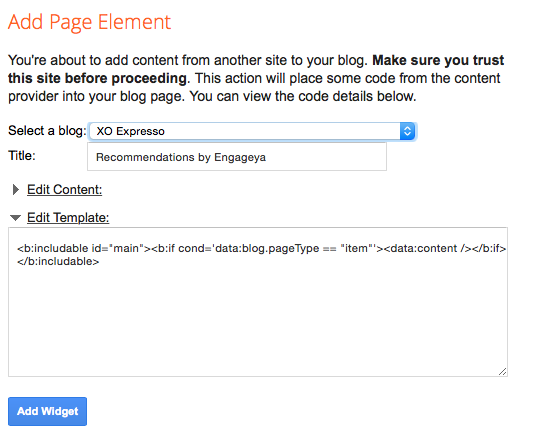
2. If you’ve selected the Blogger Platform, it will load the add widget screen. Select the blog you want to place the widget on. Click the arrow to expand the Edit Template Box. Replace the code shown
<b:includable id="main"><data:content /></b:includable>with the following
<b:includable id="main"><b:if cond='data:blog.pageType == "item"'><data:content /></b:if></b:includable>and select Add Widget. The related posts will now only show on each posts and not on the homepage. Related Posts usually take some time to appear so check back in 30mins or so.