If you were on social media yesterday you may have read some confusing news about Bloglovin stealing page views.
I wasn’t going to do a post about this as there’s already a lot of information out there, but I’ve got a few messages so thought a blog post would be best to explain what is happening and what you can do about it.
Update: Bloglovin have responded overnight. They have fixed the canonical URL issue, saying that it was an oversight. They have changed it to the blog URL instead of their own URL. You can view the tweets here.
@XOmisse our apologies! The canonical URL issue has been fixed! Please feel free to reach out to support@bloglovin.com with any questions.
— Bloglovin’ (@bloglovin) March 27, 2017
Why bloggers call out Bloglovin
Bloglovin’ is a popular way to read and follow blogs with over 25,000,000 people per month visiting the site.
Unlike some other RSS feed readers, Bloglovin’ state that they send traffic to bloggers in multiple places on their website.
Yes, all clicks that come from bloglovin.com count towards your traffic. In fact, Bloglovin has become the top traffic source for quite a few lifestyle blogs with many followers. Every time a member reads an article on Bloglovin.com or clicks on an email, it counts in your analytics and shows your ads.
However, it seems that is not the case!
Bloglovin’ change how users read posts
Up until now, users have clicked on a post title to be taken directly to the live blog, which may or may not show the Bloglovin’ frame at the top of the window depending on your settings.
However, users started to notice that Bloglovin now show full posts on their platform – letting users read your posts in full on their site without having to click-through directly to your site.
This naturally got people talking as they were worried about losing traffic to their own blogs. A topic which regularly comes up, in fact Tumblr previously blocked Bloglovin’ after disputes about the Bloglovin frame.
Personally, I don’t have an issue with posts being displayed as full on their platform. This is how most feed reader services work as it’s the most convenient to users. The real problem unfortunately is worse than that…
Bloglovin’ seem to be claiming your content as their own
Upon viewing the source code on Bloglovin’, it seems that they are setting the canonical URL as their own.
This means that they are using a piece of code to tell search engines where the original version of content is from.
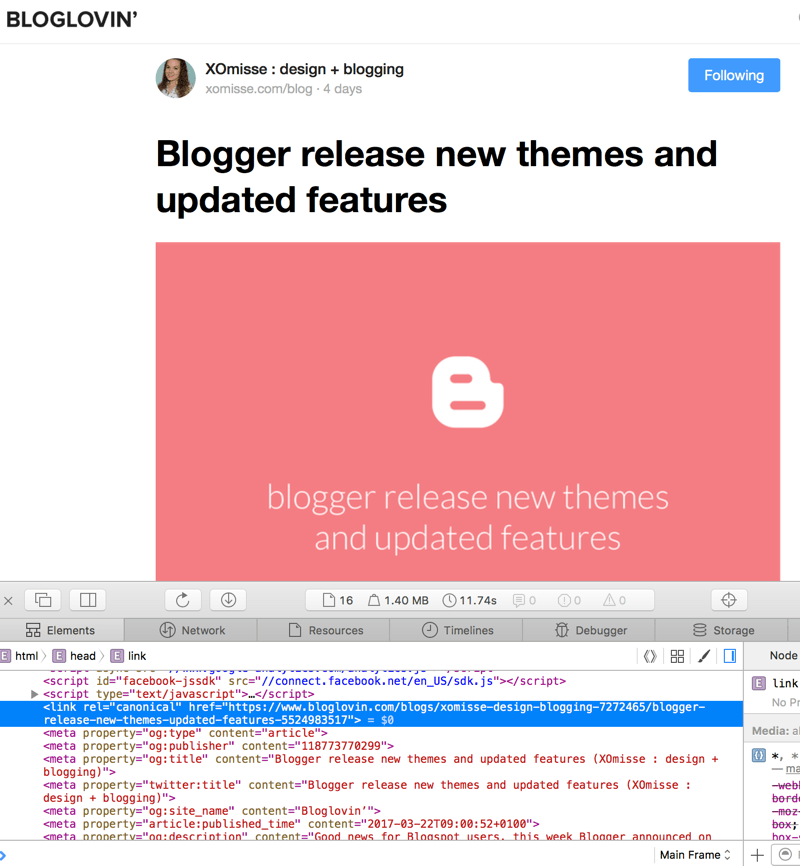
The problem with this is that they are using their own URL as that source. Therefore telling search engines such as Google that they own the content.
Since this content is also on your site and their version will be seen as the original version, the post on your blog will be a duplicate and could result in you getting penalised.
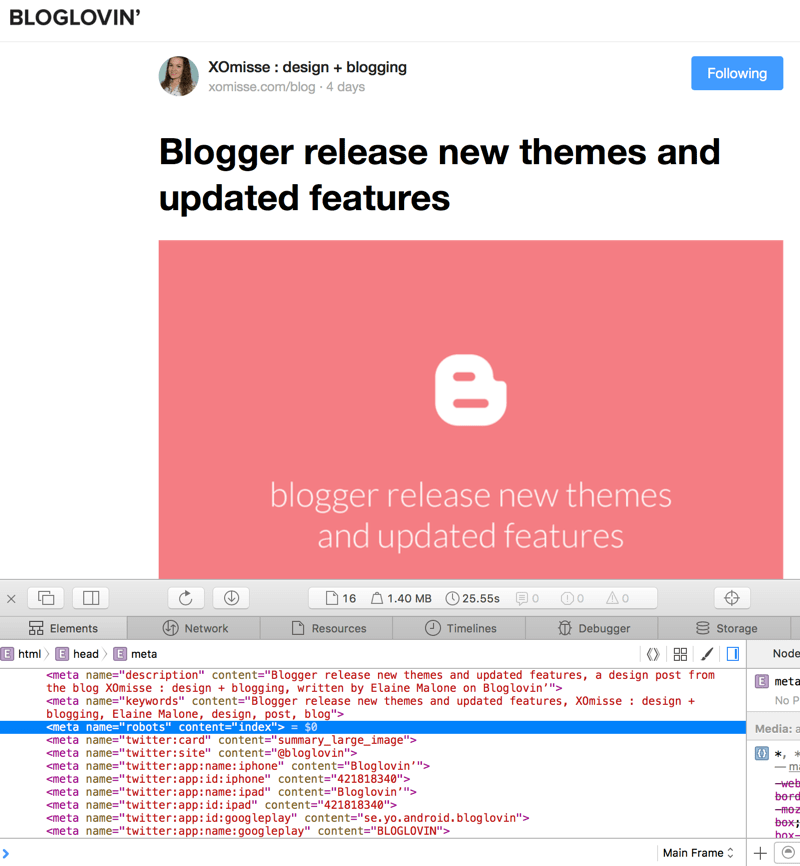
Looking further into it, some posts on Bloglovin have the robots tag set to noindex meaning the canonical tag would be ignored. Some posts however have it set to index, meaning those posts will be indexed by search engines.
Why this is an issue?
They are telling search engines that they are the original owner of the posts on their site and that search engines should index and rank those posts.
Strange… posts on one of my blogs on BL is set to index, but from another blog is set to noindex. Both with Bloglovin as canonical tag.
— XOmisse • Elaine (@XOmisse) March 25, 2017
Can’t I just delete my Bloglovin account?
No, not really. If you have a public RSS feed, then ANY RSS feed reader can pick up your blog and display your posts. Deleting your Bloglovin account won’t change this. This is explained further on their help page.
The issue isn’t that full posts are being displayed through the platform. The issue is marking their version of our content as the original, and in some cases ranking higher in search engine results pages than the blog itself.
What can I do to prevent Bloglovin’ doing this?
1. Change your RSS feed settings
I recommend switching your RSS feed to summary/short instead of full. This will affect all RSS feed readers, but if you have an issue with your content being available in full via a feed reader, then this is the solution. This is not the same as displaying your posts as full or excerpt on your blog, this is your RSS feed settings.
To do this:
- On WordPress.org (self-hosted) Settings > Reading > Choose Summary
- On WordPress.com (free hosted) WP Admin (
https://yourblog.wordpress.com/wp-admin/) > Settings > Reading > Choose Summary - On Blogger Settings > Other > Site Feed > Allow Blog Feed > Choose Short (you could also choose Until Jump Break if you use that feature)
- On Feedburner Optimize > Summary Burner
I’ve seen some people ask why they should *have* to do this when Bloglovin is “scraping content and infringing on copyright”. This is actually a grey area since you’re providing the full content in your RSS feed which you have made publicly available.
ANY RSS aggregation service or feed reader can pull in that feed and you control what is on that feed. It kind of depends how they are doing it, whether they are seen as RSS reader or RSS scraper though.
2. Block Bloglovin from your RSS feed
Ashley, from NoseGraze, has also done a blog post on this where she explains some other methods for blocking Bloglovin’ from accessing your RSS feed. You’ll need to be self-hosted to do this.
Why I moved away from Bloglovin’
While we’re on the topic, I moved away from using Bloglovin’ to read blogs a while ago. I disliked the direction they were taking the platform such as the ability to publish posts and comments directly on the site .
Conclusion
I’m hoping that in the coming week Bloglovin’ respond to this issue, which I am hoping was a coding mistake (though a pretty silly one). I’ll continue to update this post as information comes through.