A sitemap acts like a directory for your website — it lists all your posts and pages so search engines can easily crawl and index them. For Blogger users, it’s one of the simplest ways to help Google and Bing understand your site structure and keep your new content visible in search results.
In this post, I’ll show you how to find your Blogger sitemap, submit it to Google Search Console and Bing Webmaster Tools, and fix common issues. Whether you’ve just started your blog or want to improve your SEO, this guide will walk you through the process step by step.
What is a sitemap and why does it matter?
A sitemap is a file that tells search engines what pages exist on your site and when they were last updated. Submitting one ensures your content is discovered faster — especially if you’ve recently launched your blog or made design changes.
Blogger automatically creates a sitemap for every blog, so you don’t need to manually generate one. However, submitting it to Google and Bing helps you monitor indexing and fix issues quickly inside their webmaster tools.
How to find your Blogger sitemap URL
Blogger’s built-in sitemap is automatically available at a specific URL. To find it, simply add one of the following to the end of your blog’s web address:
- For default Blogger URLs:
https://yourblogname.blogspot.com/sitemap.xml - For custom domains:
https://www.yourdomain.com/sitemap.xml
You can test that it’s working by opening the link in your browser. You should see a simple XML page listing post URLs — that means your sitemap is live and ready to submit.
If you have a large blog with more than 500 posts, Blogger automatically splits your sitemap into multiple files (for example, sitemap.xml?page=1, sitemap.xml?page=2). You can submit the main sitemap URL — Search Console will detect the others automatically.
How to submit your Blogger sitemap to Google Search Console
Google Search Console helps you track how your blog appears in search results and highlights any crawling or indexing issues. Here’s how to add your sitemap:
- Go to Google Search Console.
- Sign in with the Google account connected to your Blogger blog.
- If you haven’t already, add your site as a property by clicking Add property and entering your blog URL (make sure to include
https://andwwwif used). - Once verified, select your site from the sidebar.
- In the left-hand menu, go to Sitemaps.
- Under Add a new sitemap, enter
sitemap.xmland click Submit.
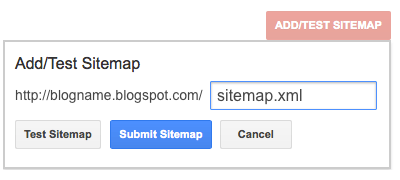
Google will confirm whether it was successfully fetched. It may take a few days for the status to update while Google processes and indexes your pages.
If you have multiple sitemap files (for larger blogs), you can submit each one separately — for example sitemap.xml?page=1, sitemap.xml?page=2.
How to submit your Blogger sitemap to Bing Webmaster Tools
Bing Webmaster Tools works similarly to Google Search Console and covers both Bing and Yahoo search visibility.
- Visit Bing Webmaster Tools.
- Sign in with your Microsoft, Google or Facebook account.
- Click Add a site, enter your blog URL and follow the verification steps.
- Once verified, go to Sitemaps in the left menu.
- Click Submit sitemap and enter the full URL of your sitemap — for example:
https://www.yourdomain.com/sitemap.xml
You’ll then see your sitemap listed with its submission status and the date Bing last crawled it.
Troubleshooting common sitemap issues
If your sitemap isn’t being processed or you see an error, here are a few common reasons and fixes:
- 404 or couldn’t fetch: Double-check the URL and make sure your blog is set to public (not private in Blogger settings).
- Submitted URL not found (404): Check if you’re using the correct domain version (
https://andwwwwhere applicable). - Only some posts showing: Blogger may have split your sitemap into multiple pages; submit each page as needed.
- Indexing taking too long: This is normal, especially for new blogs. Keep publishing new content and check back in a few days.
Best practices for Blogger sitemaps
- Always use the HTTPS version of your sitemap URL if your blog uses SSL (most do now).
- Don’t block important pages in your robots.txt file — Google reads it before crawling your sitemap.
- If you change your domain or switch to a custom URL, resubmit the sitemap in both Google and Bing.
- Check your sitemap status in Search Console every few months to catch any crawl errors early.
- You don’t need to resubmit your sitemap after every new post — Blogger updates it automatically.
Final thoughts
Submitting your sitemap is one of those small but powerful steps that can make a real difference to your blog’s visibility. Once it’s in place, Google and Bing will automatically detect new posts and keep your content indexed — helping you reach more readers and grow your audience.