My previous post talked about the new Stories feature on Instagram and I’m back today to talk about Instagram again! Instagram have started to roll out Business Profiles, giving users access to new business features and Instagram Insights. This is obviously a great tool for small business owners but I think this new feature will be really useful to bloggers and freelancers also.
Instagram Business Profiles
Business profiles are free and will be available to all users who want to be recognized as a business. You will need to connect your account to a Facebook page as it pulls a lot of information from there but once you convert to a business profile, you’ll have access to a couple of new features.
New Business Information
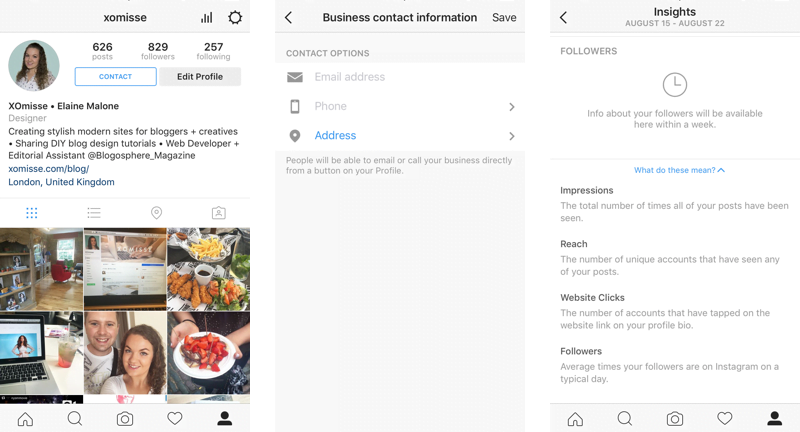
You will be able to add more information to your profile. The business type that you’ve chosen on your Facebook page will be reflected under your Instagram name as a tagline. There is a personal blog option! You’ll also be able to add contact information such as a phone number, email address and business address/location.
A contact button will appear at the top of your profile beside the follow button. Depending on what information you provide, customers can tap the button to call, text and email you as well as look up directions to your business location. A small change but adding that call to action could be a huge benefit, especially to freelancers who use Instagram as a blog and portfolio instead of having a website.
Instagram Insights + Promotion
You’ll also gain access to Insights showing you information about your followers, follower activity (how often and when they use Instagram), engagement (unique accounts that liked/comments on posts), impressions (number of times your post has been seen), reach (number of unique accounts who saw your post), website clicks and other statistics.
Similarly to boosting a Facebook post, Instagram now allows you to promote posts. Tap the Promote link, add a call to action and a URL. You’ll then be able to choose your target audience, budget and the duration it will run for.
How to switch to a Business Profile
1. On your profile page, tap the settings icon then Switch to Business Profile. If you don’t see this option then you should in the coming weeks as the feature is still being added.
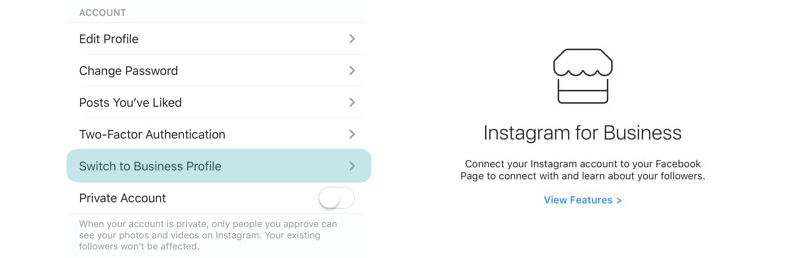
2. It will first ask you to connect to Facebook and choose the Facebook page that you want to associate with your Instagram business profile. This is a necessary step to switch to a business profile.
3. Once this is done, you can change your contact information and other details on the Set Up Your Business Profile page.
I just switched to a business profile on Instagram and got some cool new features
Filter Comments
Instagram will soon let you filter comments! They have tested it out on celebrity accounts for a while now and it looks like all users will be getting it soon. This will allow you to turn off comments on each post or set up a filter to block certain comments.
What to you think of the new changes? Will you be switching to a business profile?