Earlier this year, Instagram rolled out a change to its dimensions that cropped all Feed post previews in the grid from the classic square (1:1) to a 3:4 aspect ratio causing frustration for creators and brands.
But there’s finally some good news…
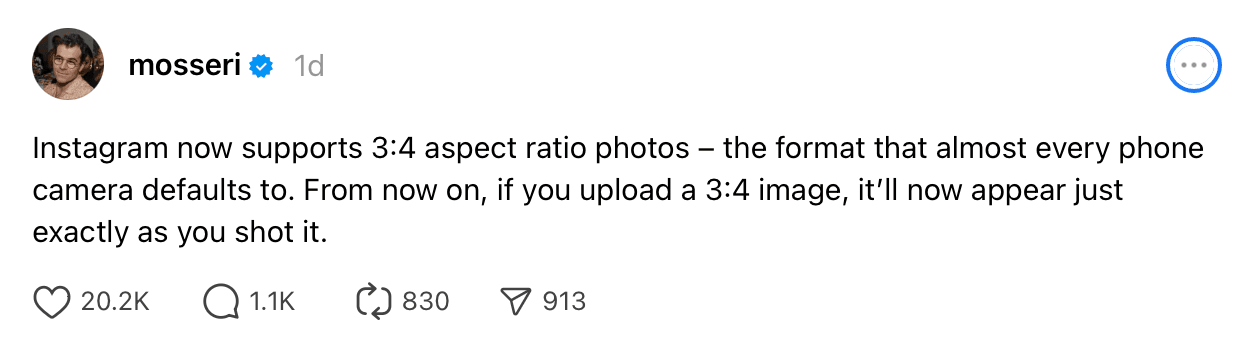
Instagram now supports 3:4 aspect ratio uploads for Feed posts. No more unwanted cropping, and no more guessing how your post will show up on your grid.
Let’s talk about what this means, how to format your visuals going forward, and the key Instagram post sizes to keep in mind for 2026.
Why Instagram sizing matters
Size matters on Instagram, especially if you care about how your content shows up in the feed and on your profile.
For years, square (1:1) was the go-to. But I haven’t recommended that format for a long time. Why? Because it takes up the least amount of vertical space on the feed. And if you’re trying to grab attention as people scroll, taller posts give you a much better chance of stopping the scroll.
Up until now, the 4:5 (1080 x 1350px) vertical ratio was the sweet spot for Feed posts. It’s taller than a square but still supported across the app.
But with the profile grid now previewing posts at 3:4 (1080 x 1440px), many 4:5 uploads have been getting awkwardly cropped at the sides in the grid view.
The new 3:4 feed format
Instagram’s new support for 3:4 aspect ratio uploads in the Feed is a welcome change. It means your posts can match the updated grid preview, keeping your profile looking neat and consistent.
That said, if you’re still using 4:5 (like many of us are), I’d recommend leaving buffer space on either side of your design or photo. Keep key elements centred so nothing important gets cut off in the grid crop. Think of it as designing with a “safe zone” in mind.
For now, 4:5 is still the safer default if you ever want to boost a post as an ad, since 3:4 uploads (1080 x 1440px) currently can’t be promoted. If you’re not running ads on this content, 3:4 is worth using for how cleanly it matches the new grid preview. Either way, keep your key elements centred so nothing important gets lost to the crop.
Instagram Post Sizes (Updated for 2026)
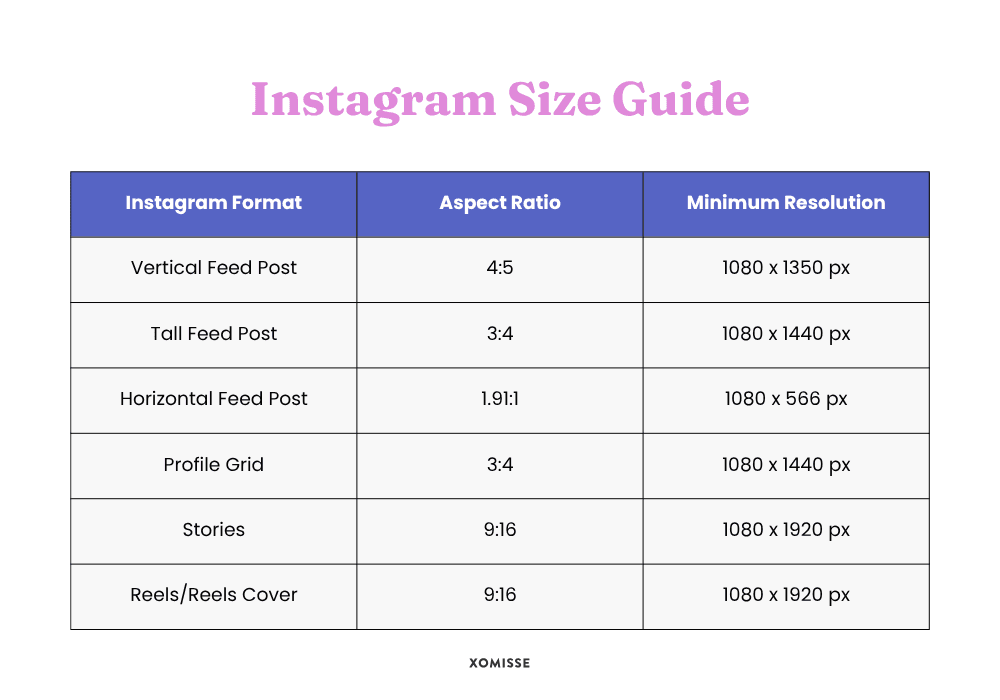
To make life easier, here’s a breakdown of the latest Instagram image dimensions you need to know in 2026:
| Instagram Format | Aspect Ratio | Resolution Size |
|---|---|---|
| Tall | 3:4 | 1080 x 1440 px |
| Vertical/Portrait | 4:5 | 1080 x 1350 px |
| Square | 1:1 | 1080 x 1080 px |
| Horizontal/Landscape | 1.91:1 | 1080 x 566 px |
| Reels + Covers | 9:16 | 1080 x 1920 px |
| Stories | 9:16 | 1080 x 1920 px |
| Profile Grid Preview | Cropped to 3:4 | 1080 x 1440 px |
Instagram Sizes + Specs
Instagram Feed Posts Sizing
- Tall: 1080 x 1440 px (3:4) – newly supported + grid friendly
- Vertical/Portrait: 1080 x 1350 px (4:5) – still great, but design carefully
- Square: 1080 x 1080 px (1:1) – less scroll space, not ideal
- Horizontal/Landscape: 1080 x 566 px (1.91:1) – only good for wide shots
Other Instagram Sizing
- Reels & Reel Covers: 1080 x 1920 px (9:16)
- Stories: 1080 x 1920 px (9:16)
- Profile Grid Preview: Cropped to 3:4 (even if you upload in 4:5 or 1:1)
- Profile picture: 320 x 320px minimum (1:1)
Instagram Reel Specs
- Duration: Reels can run up to 3 minutes recorded in app, uploads from your camera roll can go longer
- Minimum length: 3 seconds
- File size: keep it under 4GB, most well exported Reels come in nowhere near that limit
- Format: export as MP4 with H.264, MOV works too
- Frame rate: 30fps is the safe default, 60fps if you’re shooting anything fast moving
Instagram Carousel Specs
- By default, every slide crops to match the first slide’s aspect ratio, so keep them consistent unless you’re using the option below
- Instagram now has a “Mixed” resize toggle at upload that lets you combine square, portrait and landscape slides in one carousel without the auto crop, worth using if your content needs different shapes
- 4:5 (1080 x 1350px) is still the safest default for a fully consistent carousel, it gives you the most space without risking the 3:4 grid crop
- You can add up to 20 slides, but most carousels that actually get saved sit in the 5 to 10 range
Instagram ad sizes
Organic post sizes and ad sizes aren’t quite the same thing. If you’re running or planning to run ads, here’s what to design for:
- Square ad: 1080 x 1080px (1:1)
- Landscape ad: 1080 x 566px (1.91:1)
- Vertical ad: 1080 x 1350px (4:5)
- Story and Reel ads: 1080 x 1920px (9:16)
Keep text overlay minimal on ad creative. Meta reduces reach on ads with too much text on the image itself.
FAQs
1080 x 1920px at a 9:16 aspect ratio. That fills the screen without borders or cropping.
The grid preview shows your posts at 3:4. You can now upload directly at 3:4, or stick with 4:5 and leave safe margins so nothing important gets cropped.
320 x 320px minimum, uploaded as a square. Instagram displays it as a circle everywhere on the app, so keep your face or logo centred.
Upload at one of Instagram’s supported ratios, 3:4, 4:5, 1:1 or 1.91:1, rather than letting the app crop an unsupported size for you.
My recommendations for creators and brands
- Start designing for 3:4 if you’re not running ads. It’s supported, matches the grid preview and means no cropping surprises. If ad eligibility matters for this content, stick with 4:5 instead.
- If you’re still using 4:5, leave safe margins to avoid important elements being cropped on your profile.
- Avoid square (1:1) posts unless necessary. They take up less real estate and are less effective at grabbing attention.
- Test and preview using tools like Canva or scheduling apps that show you how your post will appear in the grid.
Final thoughts
Instagram’s layout changes may be subtle, but they make a big difference to your content strategy.
Use 4:5 if you want the option to run ads, use 3:4 if you want a clean match with the new grid preview and steer clear of square unless you’ve got a specific reason to use it.
Don’t let it stop you from posting. Pick your default, design with the crop in mind and you won’t be caught out next time Instagram changes the rules again.