I received a couple of emails lately from bloggers asking why they appear to be a no reply blogger – this simply means that your email address is protected and isn’t being shown when you interact with a blog. It’s actually quite common and not a lot of people realise that they are no-reply bloggers too. Todays tutorial will very quickly show you how to fix this issue.
Heads up! This post is no longer being updated, so some details may be out of date.
What is a no-reply blogger/reader?
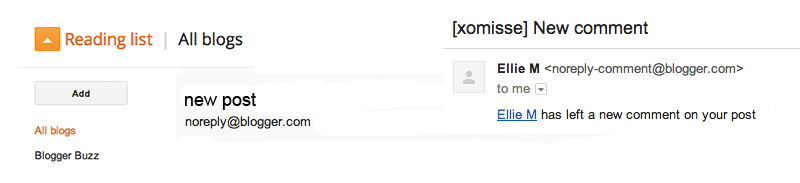
When you leave a comment on a blog as a reader, an email is typically sent to the blog author to notify them. A lot of bloggers reply to comments this way, by replying to the email. For them to be able to do this, there has to be an email address visible in your Blogger profile. Otherwise, the email address is shown as noreply-comment@blogger.com. The tutorial below will show you how to change this. Don’t forget to share this post with your readers so that you can reply to them via email.
How to be a reply blogger/reader?
- If your blogger account is connected to a google+ account, you need to disconnect them to perform the steps. You can re-connect them again afterwards. To do this, go to Blogger Homepage, click on the gears icon on the right and select Revert to Blogger Profile.
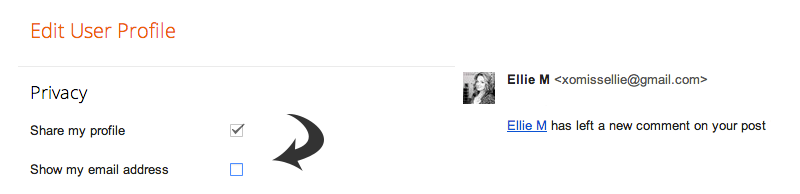
- On the Blogger Homepage, click on your name in the upper right hand corner. Click Blogger Profile and then Edit Profile. Under privacy, make sure “Show my Email” is ticked. You can change the email address under Identity. Scroll down and save.
- You can now re-connect your Blogger and Google+ accounts, this shouldn’t affect the settings.
It’s worth keeping an eye on these settings every few months as Blogger tends to switch it off automatically. You could leave your blog disconnected from Google+ which should stop it from changing, but G+ does have huge advantages as a blogger so that’s up to you and I wouldn’t advice it.