If you’ve spent any time on Instagram recently, you’ve probably heard about Instagram Trial Reels. In this post, I’ll explain what they are, why they matter and how to use them strategically to grow your following.
What are Instagram Trial Reels?
Trial Reels are probably one of Instagram’s best new features. They show up just like regular Reels in the feed and Reels tab, but only to people who don’t follow you yet, and they don’t land on your profile.
It’s a low-pressure way to test new content. A chance to throw an idea at a completely new audience and see what happens.
Who can use Trial Reels
You’ll typically need 1,000+ followers and a professional account, though I’ve seen it work on smaller accounts too.
Create your Reel as usual, then before you hit share, toggle on the Trial option (see the screenshot below). Turn off “Share to everyone automatically.” You want it to keep running as a Trial Reel so it reaches new viewers, not your current followers.
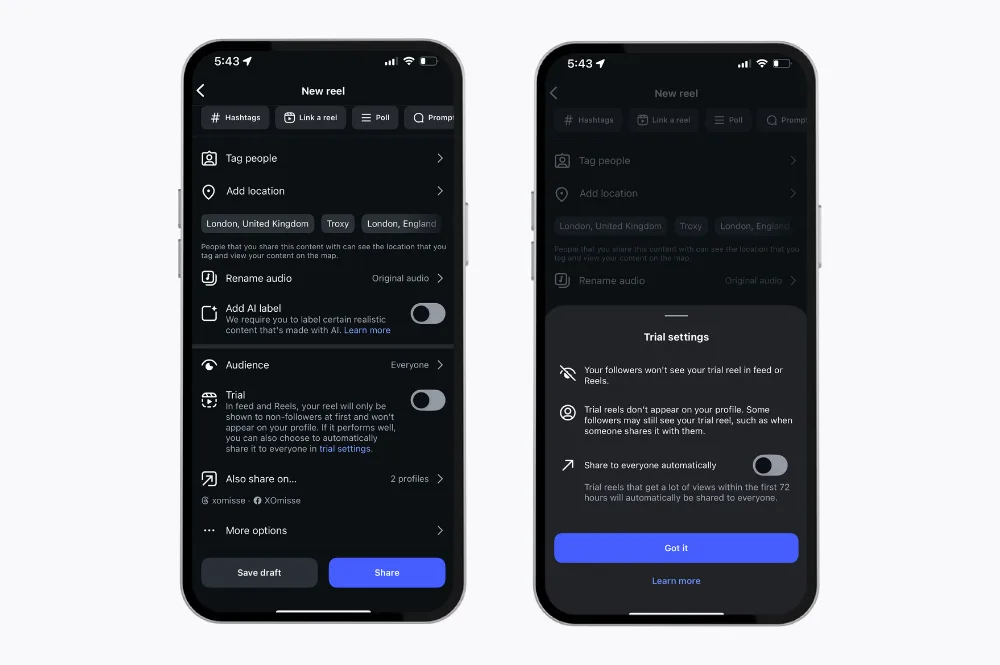
Instagram does cap how many you can post in a day, it varies per account but it’s typically around the 15 mark, and they’ll message you once you’ve hit it. Treat it as a testing tool, not a spam button.
Trial Reels vs regular Reels: what’s different
- Who sees it: a regular Reel goes to your followers and can be picked up by the algorithm for anyone. A Trial Reel only goes to people who don’t follow you yet
- Where it lives: a regular Reel sits on your grid and in your Reels tab straight away. A Trial Reel stays out of both until you choose to share it
- What you can learn: a regular Reel mixes your existing audience’s reaction in with everyone else’s. A Trial Reel gives you a cleaner read on how a completely cold audience responds
- The risk: a regular Reel that flops sits on your profile for anyone who visits. A Trial Reel that flops just disappears. Nobody but you ever knows
Use a regular Reel when you already know it works. Use a Trial Reel when you don’t, and you want to find out before it’s public.
Why Trial Reels are worth testing
Posting consistently but still feel like your content’s disappearing into the void? Trial Reels might be the fix.
- Boost visibility: shown to people who don’t follow you yet, more chances to be discovered
- Test your ideas: try different hooks, topics and styles without touching your main feed
- Gather data: every Trial Reel tells you something about what your ideal audience actually responds to
- Grow your audience: attract followers who genuinely connect with your message, not just anyone scrolling past
Treat Trial Reels as mini-experiments. Over time, you’ll learn what resonates most and can use that information to refine your overall content strategy and post more of.
Recommended reading: Understanding the Instagram algorithm and ranking in 2025
How to create effective Trial Reels
Because Trial Reels are for people who don’t know you yet, your approach needs to be different from your regular content. Think of them as a testing ground. They don’t need to be perfect, polished or complicated.
1. Get specific about your message
Your message needs to be clear, focused and easy to understand. Stick to one topic, story or insight per video.
The more specific your message, the easier it is for the right person to see themselves in it, and the easier it is for the wrong person to scroll past.
2. Hook and share quick value
I know, you’re sick of hearing about hooks. But the first few seconds decide everything, it’s the difference between someone stopping and someone walking straight past.
Be specific. Say you’re a wedding photographer. A generic Trial Reel might open with “Here’s a tip for your wedding day.” That could be anyone’s advice, so a cold audience has no reason to stop. A specific one sounds more like: “POV: you’re getting married next year and every photographer’s portfolio looks exactly the same,” which hits a real frustration your ideal audience is actually having.
Once you’ve got their attention, give them a reason to stay. A small tip, a short story, a glimpse of what your account’s about. Give them a reason to follow without ever having to say “follow me.”
3. Use the caption to connect and convert
Your caption matters just as much. It’s often the first thing a new viewer reads, so it needs to make sense entirely on its own. Keep it simple, keep it short, and make it obvious who you are and why they’d want to stick around.
A caption that works has a simple shape: one line that makes a stranger want to keep reading, a line or two on who you are, and one line on what they’ll get if they follow. Don’t just repeat your hook, the caption is where you go slightly deeper.
For that same photographer, it might look like this:
“If you’ve scrolled forty portfolios and they all look the same, you’re not being picky, you’re just seeing the same five shots over and over. I’m [name], a wedding photographer who got into this because I always found more atmosphere in the moments nobody’s posing for. I post the questions I ask every couple before the day and the shots that don’t make the highlight reel but should. Follow along if that’s the kind of photography you want.”
Keep each part to a sentence or two. A new viewer should be able to read the whole thing and know exactly who you are and what they’d be signing up for.
4. Review, learn and refine your strategy
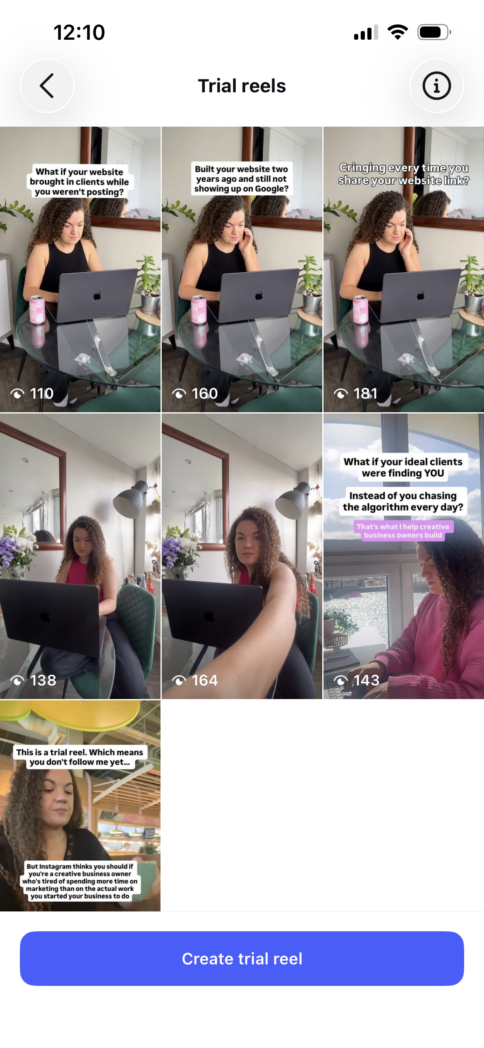
Not every Trial Reel takes off. That’s normal. In fact, it’s normal for the majority of them to perform worse than your typical Reels. The point is that you’re not chasing viral, you’re gathering data. It could take 20+ Trial Reels before a real pattern shows up and one takes off.
Change one variable at a time and watch what moves: views, saves, comments, profile visits. Which hooks pull in the right audience? Use what works to shape your regular content too.
A few extra tips
- Don’t post exact duplicate Trial Reels, as performance drops. Tweak something each time
- Use Instagram Edits so you can duplicate and adjust versions quickly
- Try a “this is a Trial Reel, here’s what I do and why you should follow if you’re…” style Reel as a straightforward introduction
- Don’t let Instagram auto-upgrade a Trial Reel to your feed. If you want it there, post it separately. Keeping Trial Reels distinct is what helps them keep reaching people who don’t follow you yet
Until recently, Trial Reels only lived inside the Instagram app. However, a few scheduling tools now support Trial Reels directly, so if you batch content on a desktop, it’s worth checking whether your scheduler has included this feature.
Trial Reels questions you might still have
Q. Who can actually use Trial Reels?
You’ll need a professional account, and Instagram typically limits the feature to accounts with 1,000+ followers. If you’re not seeing the Trial option, that’s the most likely reason.
Q. How many Trial Reels can you post in a day?
It varies per account, but it’s typically around 15. You’re unlikely to hit that as a small business owner, but it’s worth knowing the cap exists so you don’t panic mid-batch-recording when the option disappears.
Q. What happens if a Trial Reel doesn’t perform well?
Nothing, that’s the whole point. It stays a trial. It never reaches your followers, never sits on your grid, nobody sees it flop. Leave it as is or move on to the next idea.
Q. Can you turn a Trial Reel into a regular one later?
Yes. If it performs, share it to everyone and it behaves like any other Reel from there. Just don’t let Instagram auto-upgrade it mid-test if you’re still comparing versions. You want to be the one deciding when it turns into a regular Reel.
Q. Does a Trial Reel count as one of my posts?
Not while it’s still a trial. It won’t show up on your profile or count toward your grid until you actively share it.
A final thought
Trial Reels are your own little playground on Instagram. Experiment, see what sticks, learn something about your audience with every try. Focus on the people who genuinely connect with what you share. Those the ones who will follow along, engage and stay long-term.